How to Integrate AI Into Your Existing Business Software
BY : Sdreatech
27-Nov-2026
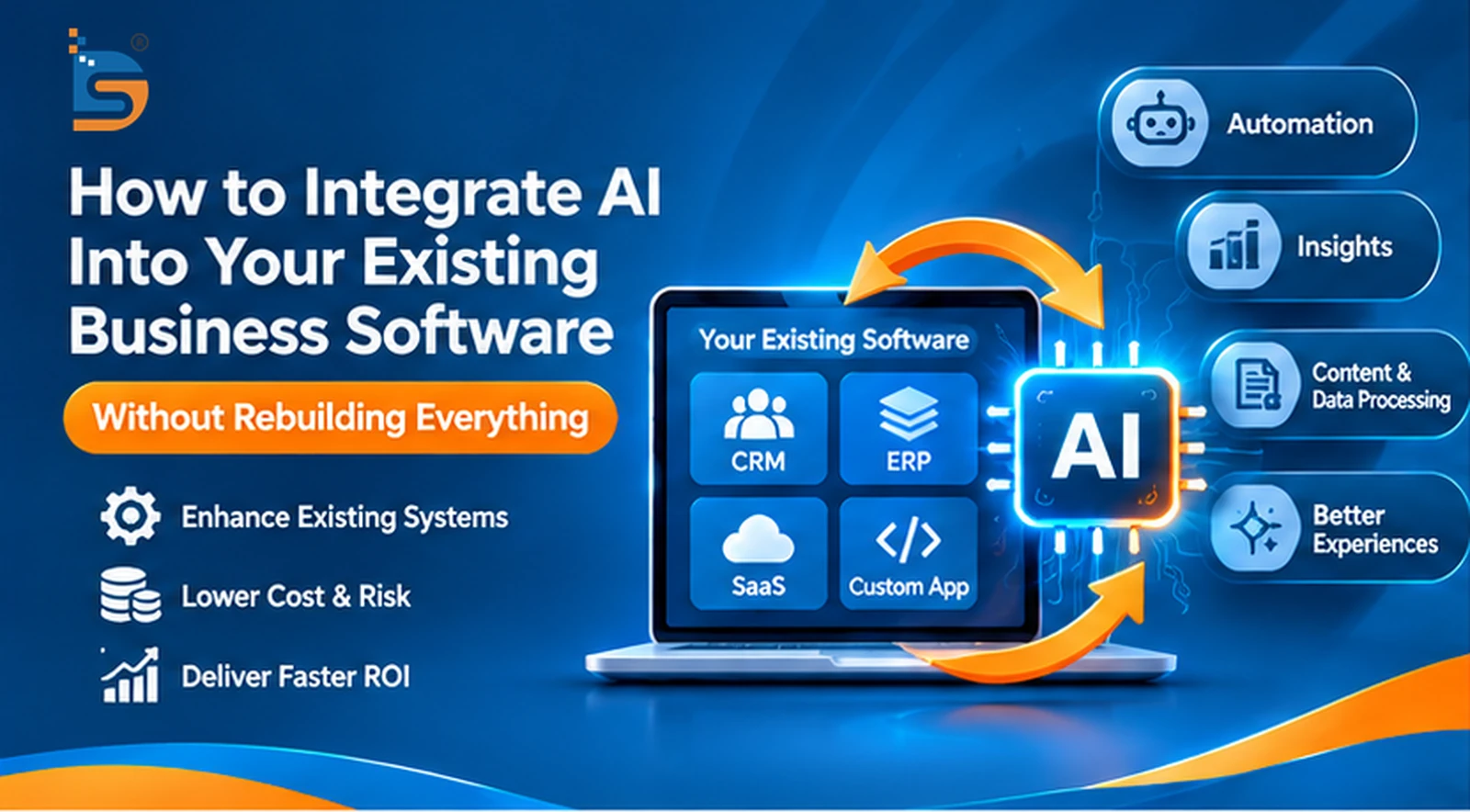
Businesses do not necessarily need to replace their CRM, ERP, SaaS platform or custom software to benefit from artificial intelligence. In many cases, AI can be added through APIs, connectors and a dedicated integration layer while existing applications continue to manage core business processes.
The key is to identify a measurable business problem, connect approved data sources, select an appropriate AI capability and introduce it through controlled workflows. For organizations evaluating AI integration services, this guide explains the architecture, implementation steps, costs, risks and practical opportunities involved.
What is AI integration in existing business software?
AI integration is the process of connecting artificial intelligence capabilities to an existing application or workflow. It allows software to perform tasks such as document extraction, semantic search, forecasting, classification and assisted decision-making without necessarily replacing its underlying business logic or database.
For example, a CRM can use an AI service to summarize customer interactions while retaining its existing contact records and permissions. An ERP can extract invoice fields for review without allowing a model to directly approve payments. The existing application remains the system of record.
AI integration vs custom AI development vs software replacement
The right approach depends on the condition of the existing platform, the complexity of the requirement and the level of control needed. Integration and custom development are complementary rather than mutually exclusive.
| Approach | Best suited for | Main consideration |
|---|---|---|
| AI integration | Stable existing software with accessible APIs or data | Compatibility and workflow controls |
| Custom AI development | Specialized AI capabilities or differentiated products | Evaluation, engineering and ongoing maintenance |
| Software replacement | Unsupported or fundamentally unsuitable legacy systems | Migration risk, cost and operational disruption |
A business may combine integration with custom AI development when a standard model or connector cannot meet its requirements. Where the existing platform has serious architectural limitations, targeted custom software development may be necessary before introducing AI.
AI integration architecture for existing business software
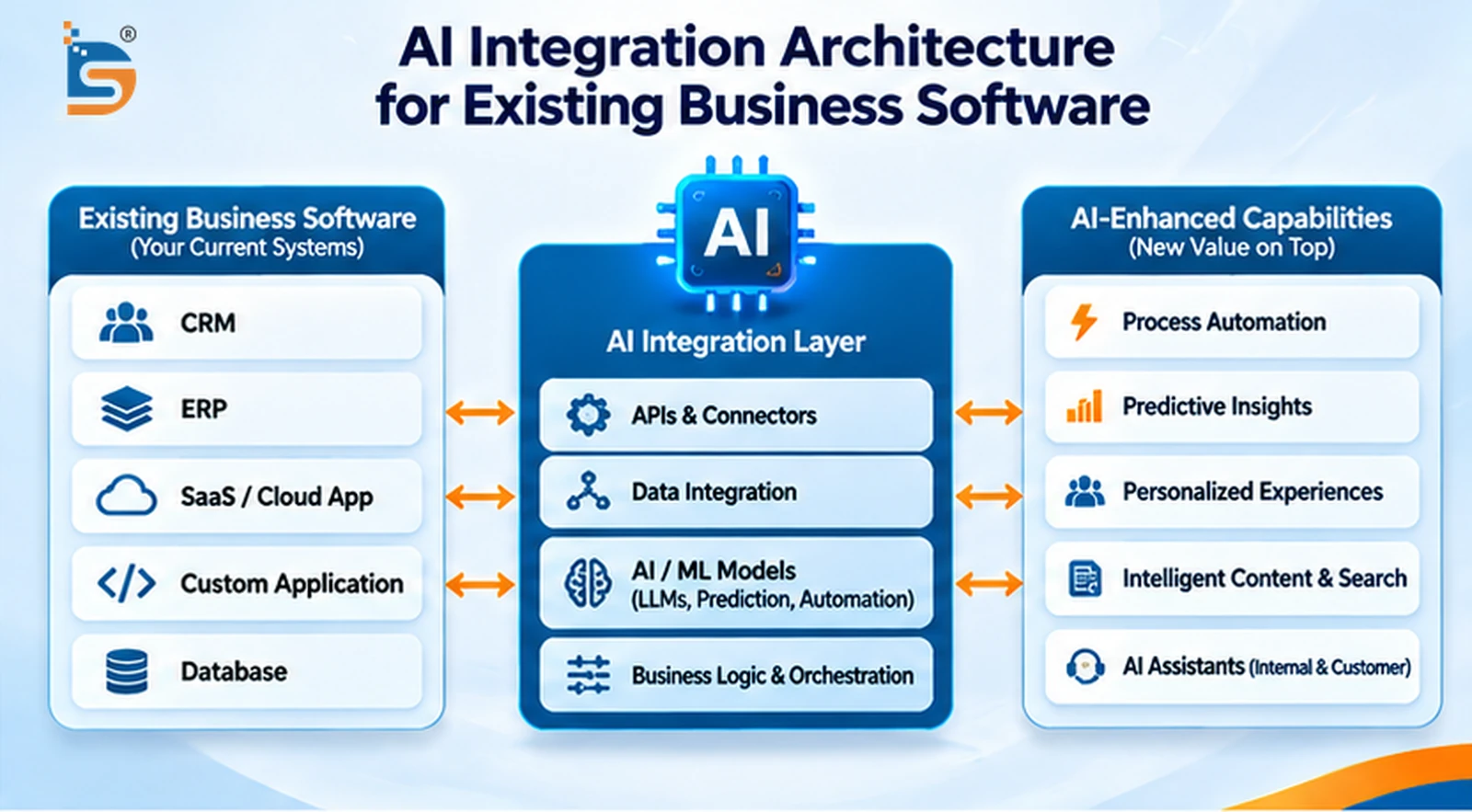
A dedicated integration layer separates AI services from the core application. This makes it easier to enforce permissions, change model providers, monitor costs and manage failures without tightly coupling every business feature to a particular model.
Existing application and data sources
CRM records, ERP transactions, documents and approved external data remain under their existing ownership and access policies. Use supported APIs or controlled read-only access rather than unrestricted database credentials.
Integration and orchestration layer
Backend services authenticate requests, validate inputs, retrieve permitted data, call models and validate outputs. Queues can handle long-running tasks without blocking the application.
AI models and retrieval
Select language models for text tasks, OCR or document models for extraction, and statistical or machine learning models for forecasting. Retrieval-augmented generation (RAG) supplies relevant approved documents to a model at request time.
Business rules and human approval
Deterministic rules validate amounts, identifiers and required fields. High-impact actions require appropriate authorization and human review. AI-generated suggestions must not bypass existing controls.
Monitoring and feedback
Track latency, model usage, errors, quality and business outcomes. Record model and prompt versions while minimizing sensitive information in logs. Provide fallback behavior when an AI service is unavailable.
Event-driven APIs and orchestration can be implemented using technologies such as Node.js development, Python or the existing backend stack. The architecture should fit the application rather than require an unnecessary technology migration.
Practical AI integration use cases across business software
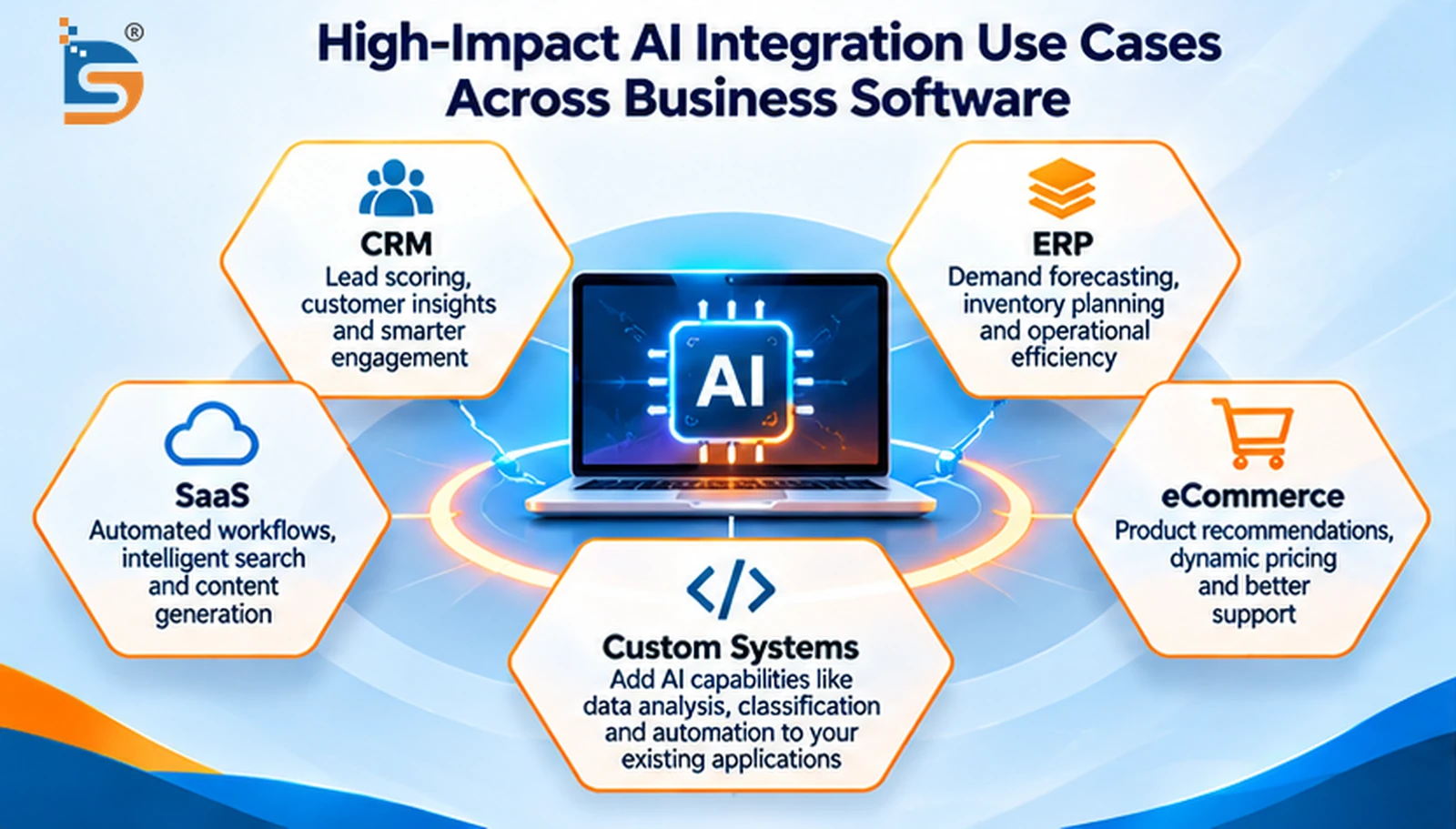
1. CRM and customer service
Summarize customer conversations, draft support replies and retrieve relevant product information. Agents should verify generated replies before sending them, particularly when commitments or account changes are involved.
2. ERP and finance operations
Extract invoice data, identify missing purchase order references and flag unusual transactions. Existing accounting rules and approval workflows remain responsible for financial decisions.
3. SaaS platforms
Add natural-language search, assisted reporting and workflow suggestions. Tenant isolation is essential: retrieval and model context must never expose another customer’s records.
4. eCommerce applications
Improve product discovery with semantic search, classify catalog information and assist customer support. Recommendations should be evaluated for relevance, privacy and actual conversion outcomes.
5. Custom enterprise software
Introduce document processing, internal knowledge assistants and structured data extraction into existing workflows. For field teams, mobile app development can extend approved AI features to mobile interfaces while keeping sensitive processing on authorized services.
Which AI integration approach should you choose?
| Approach | Suitable tasks | Key limitation |
|---|---|---|
| Model API | Summarization, extraction, drafting | Provider dependency and usage costs |
| RAG | Answers grounded in internal documents | Retrieval quality and access control |
| Traditional machine learning | Forecasting and anomaly detection | Representative historical data required |
| Fine-tuning | Repeated specialized behavior or output style | Training and evaluation effort; not a live knowledge store |
| Agentic workflows | Multi-step tasks involving approved tools | Requires bounded permissions and approval gates |
Start with the simplest approach that meets the acceptance criteria. RAG is often appropriate for changing internal knowledge, while fine-tuning may help with consistent specialized behavior. Neither guarantees accurate answers. For predictable tasks, conventional rules or search may be cheaper and more reliable than generative AI. Read our guide to custom AI development for businesses for a broader comparison of AI solution design.
Seven steps to integrate AI into existing business software
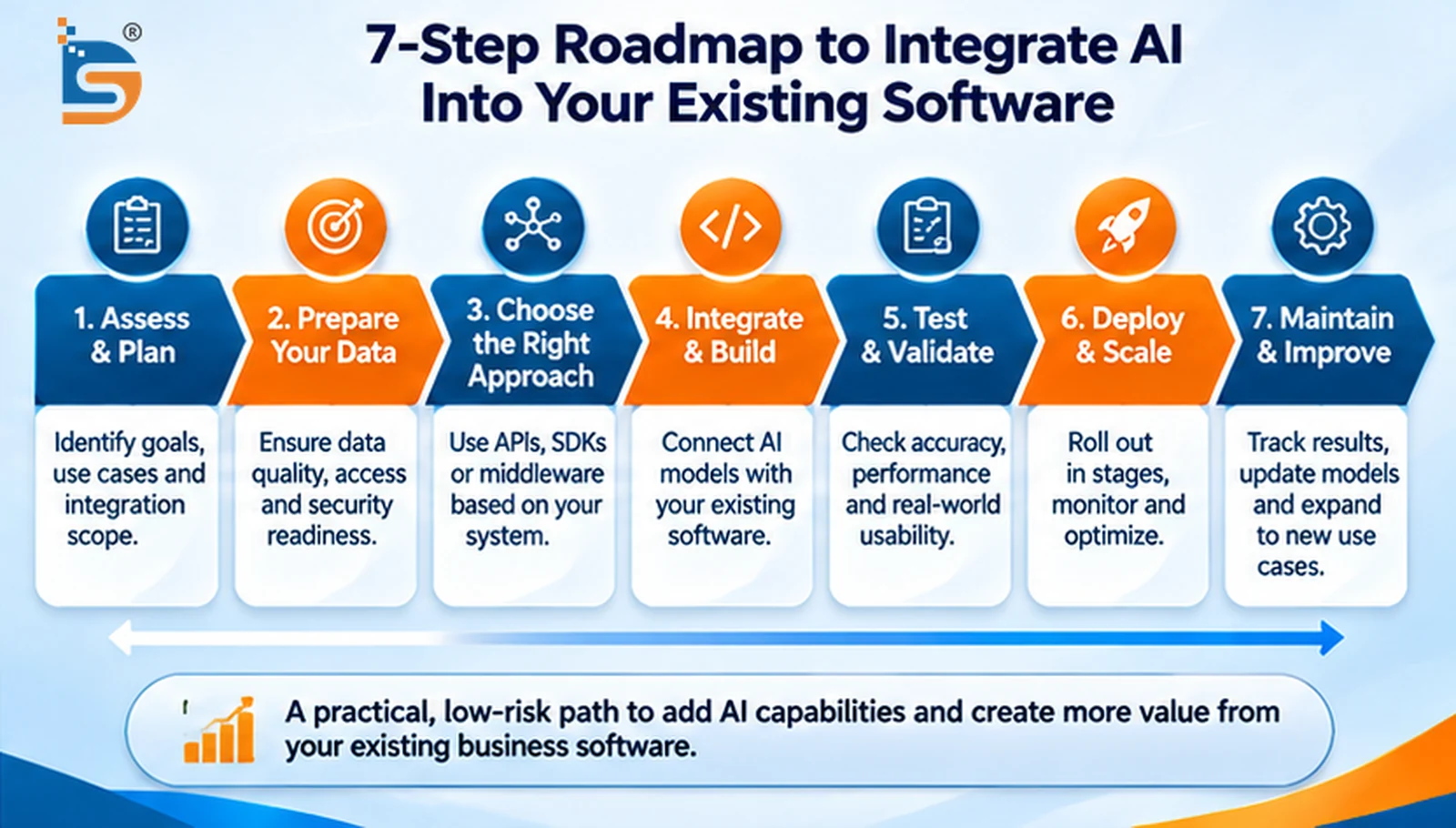
1. Assess and plan
Identify a specific workflow, its current cost, users and failure points. Define a baseline and measurable acceptance criteria. Review available APIs, licensing restrictions and whether the existing software vendor permits the proposed integration.
2. Prepare your data
Inventory data sources, remove unnecessary sensitive fields and check completeness, freshness and access rights. Establish retention policies and identify who owns each dataset. Prepare representative examples for testing.
3. Choose the right approach
Compare model APIs, existing vendor AI features, retrieval systems and conventional automation. Evaluate quality, latency, deployment location and total cost using real examples rather than relying only on model benchmarks.
4. Integrate and build
Develop a controlled backend interface, connect approved data sources and implement structured outputs, validation and authorization. Keep API keys server-side. Use retries with limits and idempotency for actions that could otherwise be repeated.
5. Test and validate
Test normal cases, missing data, incorrect outputs, unauthorized requests and prompt injection. Evaluate accuracy against labeled examples. Include users and domain experts in acceptance testing and define when the system must abstain or escalate.
6. Deploy and scale
Release to a small group first, ideally in read-only or suggestion mode. Use feature flags, monitoring and rollback procedures. Expand access only when quality, security and operational targets are met.
7. Maintain and improve
Monitor changes in model behavior, data quality, latency and costs. Re-evaluate after model or workflow updates. Collect user feedback and expand to new use cases only when the initial integration demonstrates value.
Practical example: AI-powered invoice processing in an existing ERP
Consider a business whose finance team manually enters supplier invoices into an ERP. Instead of replacing the ERP, an integration service receives invoices from an approved inbox or upload interface, extracts fields and prepares draft records. This is an illustrative example, not a claim about an actual client deployment.
- Receive and scan the document using an approved ingestion service.
- Extract supplier name, invoice number, currency, amounts and purchase order reference.
- Validate the extracted fields against ERP records and accounting rules.
- Flag duplicates, missing information and uncertain fields for review.
- Present the original document and draft record to an authorized employee.
- Submit the approved record through the ERP API and retain an audit trail.
The AI component assists extraction; it does not authorize payments or change supplier bank details. If extraction fails, the existing manual workflow remains available. This pattern can also support onboarding, document verification and other administrative processes.
How much does AI integration cost?
AI integration costs depend on the number of workflows, API availability, data quality, security requirements, evaluation effort and expected usage. A small read-only assistant is substantially different from a multi-system integration that writes financial or operational records.
| Cost component | What to budget for | Cost driver |
|---|---|---|
| Discovery and prototype | Requirements, API assessment, sample evaluation | Workflow complexity |
| Engineering | Connectors, orchestration, UI and validation | Number of systems and actions |
| Data preparation | Cleaning, indexing and permissions | Volume and quality |
| AI and infrastructure | Model usage, hosting, storage and monitoring | Request volume and model selection |
| Ongoing support | Evaluation, security updates and incident response | Reliability requirements |
For an illustrative operating-cost calculation, assume 10,000 monthly requests, each averaging 2,000 input tokens and 500 output tokens. At hypothetical rates of $1 per million input tokens and $5 per million output tokens, model usage would cost $45 per month. This is arithmetic for planning, not a current vendor quote; it excludes retries, embeddings, hosting, taxes, development and support. Actual usage may vary significantly.
A scoped discovery phase and prototype provide a more reliable estimate than a universal price range. Request separate estimates for one-time implementation and recurring operating costs.
Security, privacy and reliability best practices
AI integration introduces new data flows and potential failure modes. Treat model inputs and outputs as untrusted, including instructions embedded in documents retrieved from external sources. Apply existing application security policies to every AI-assisted workflow.
- Access control: enforce user and tenant permissions before retrieving data or invoking tools.
- Data protection: minimize personal data, encrypt communications and review provider retention and training terms.
- Prompt injection: isolate untrusted content from privileged instructions and restrict tool access.
- Output validation: validate structured responses against schemas and business rules before use.
- Human oversight: require approvals for financial, legal or other high-impact actions.
- Operational resilience: implement timeouts, rate limits, fallbacks and controlled retries.
- Compliance: assess applicable privacy and sector-specific requirements with qualified specialists.
The NIST AI Risk Management Framework and OWASP guidance on generative AI security provide useful starting points. These frameworks support risk management but do not by themselves establish legal compliance or certify a particular integration.
How to measure the business value of AI integration
Measure performance before and after deployment using comparable workloads. A useful AI feature must improve the overall workflow, not merely produce an impressive demonstration.
| Metric | Measurement | Why it matters |
|---|---|---|
| Processing time | Median time per completed task | Operational efficiency |
| Output quality | Correct results against reviewed samples | Reliability |
| Human review effort | Minutes spent checking and correcting outputs | Actual labor savings |
| Cost per completed task | AI, infrastructure and review costs divided by completed tasks | Unit economics |
| Failure and escalation rate | Failed or escalated tasks divided by total tasks | Operational risk |
For example, if 1,000 monthly invoices take six minutes each before integration and three minutes each afterward, the gross time saving is 50 hours per month. At an assumed labor value of $20 per hour, that represents $1,000 in potential monthly capacity value. If recurring integration costs are $250, the illustrative net capacity value is $750 before implementation costs. This is not guaranteed cash savings: actual benefits depend on adoption, quality and how the freed capacity is used.
When should you modernize software before adding AI?
Integration may not be the best first step when a system lacks supported interfaces, runs on insecure or unsupported components, contains inconsistent records or cannot enforce permissions. In those cases, targeted modernization may be required. A full replacement should be considered only when the business case justifies its cost and disruption.
Avoid building AI around undocumented database changes or brittle screen automation where supported interfaces are available. The objective is a maintainable business capability, not another dependency that makes the existing system harder to operate.
Frequently asked questions about AI integration
Can AI be integrated into existing software without rebuilding it?
Yes, when the software provides suitable interfaces and access controls. APIs, connectors and middleware can introduce AI features while preserving core business logic.
Can AI be integrated into legacy software?
Often, but unsupported interfaces, security limitations and poor data quality may require targeted modernization first.
Do we need to train our own AI model?
Not necessarily. Existing model APIs, retrieval systems or conventional machine learning may meet the requirement without training a foundation model.
What is the difference between AI integration and AI development?
Integration connects AI capabilities to existing systems. AI development builds or adapts capabilities and applications to meet specific requirements. Projects may involve both.
Can AI access our internal company data securely?
It can be designed to access approved data through authenticated services with permission checks, minimization and appropriate provider agreements. Security must be tested, not assumed.
How long does AI integration take?
A limited prototype may take days or weeks, while production integrations can take weeks or months depending on interfaces, data, testing and approvals. A discovery phase is needed for a reliable schedule.
Can AI integration work with CRM and ERP software?
Yes, where supported APIs or connectors exist. Start with read-only assistance or draft records and preserve existing transaction approval controls.
What happens if an AI service becomes unavailable?
A well-designed integration uses timeouts, queues where appropriate and a manual or rules-based fallback so essential business operations can continue.
Is cloud AI the only option?
No. Hosted APIs, private deployments and locally hosted models are possible. The choice depends on data governance, performance, infrastructure and operating costs.
How do we choose an AI integration partner?
Look for experience with your software stack, API integration, data governance, evaluation, secure deployment and ongoing support. Ask for measurable acceptance criteria and a clear ownership model.
Integrate AI into your business software with Sdreatech
Successful AI integration begins with a business problem, not a model selection. By preserving reliable existing systems and introducing controlled AI capabilities, organizations can improve workflows while managing implementation risk.
Sdreatech provides AI integration, custom software development and application engineering services for businesses looking to extend their existing digital platforms. Discuss your AI integration requirements with our team to evaluate your current software, identify suitable use cases and define a practical implementation roadmap.